1. First you need to find the GPO Guid
To Find the group Guide Connect to a dc server and open Active Directory PowerShell
get-gpo -all |select-object DisplayName,id |sort name >c:\gpo.txt

2. Find in Active directory the GPO with ldap search
That guid is an attribute on an object in Active Directory, so you can query for it:
(&(objectCategory=groupPolicyContainer)(name={D45A4D0F-77BE-4116-9F5B-CF96E81D2DDC}))

3.Right Click On the Guid – Properties -security
4.Advanced
5.Add the user/group
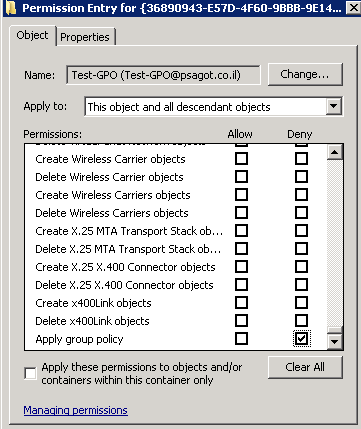
6.Deny on – Apply Group Policy


Sr. Cloud Solution Architect at Microsoft, I’m passionate about helping customers succeed by building secure, scalable, and innovative cloud solutions – with a strong focus on AI, DevOps practices, and end-to-end security. With a proven track record in the IT and services industry, I serve as a trusted advisor, partnering closely with organizations to guide them through digital transformation and maximize the value of their cloud investments. My role combines technical leadership with project ownership – from designing modern architectures to leading cross-functional implementations that drive real business outcomes. I also manage and empower strategic partners, working hand-in-hand with them to ensure project success and deliver measurable business impact for customers.


