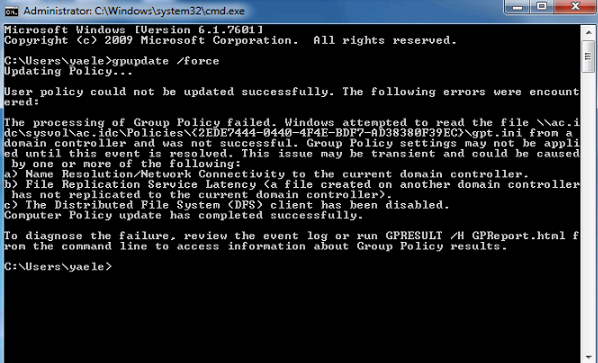
"The Processing of Group Policy failed. Windows attempted to read the file \\domain\sysvol\domain\policies\{xxxxxxxx-xxxx-xxxx-xxxx-xxxxxxxxxxxx}\gpt.ini from a domain controller and was not successful."
Under \\domain\sysvol\domain\policies\{xxxxxxxx-xxxx-xxxx-xxxx-xxxxxxxxxxxx} – there was no ini file so I realized that GPO is probably corrupted
In order to determine which group policy is causing this problem .I used PowerShell to find the friendly name of that specific GPO:
Get-GPO -id 9189e970-5663-4866-92a0-0eb2a22aab0b |select DisplayName

After recreating the gpo everything worked fine.
More information about Group Policy Cmdlets in Windows PowerShell:
https://technet.microsoft.com/en-us/library/ee461027.aspx

Sr. Cloud Solution Architect at Microsoft, I’m passionate about helping customers succeed by building secure, scalable, and innovative cloud solutions – with a strong focus on AI, DevOps practices, and end-to-end security. With a proven track record in the IT and services industry, I serve as a trusted advisor, partnering closely with organizations to guide them through digital transformation and maximize the value of their cloud investments. My role combines technical leadership with project ownership – from designing modern architectures to leading cross-functional implementations that drive real business outcomes. I also manage and empower strategic partners, working hand-in-hand with them to ensure project success and deliver measurable business impact for customers.


![clip_image001[4]](https://www.itblog.co.il/wp-content/uploads/2015/06/clip_image0014.png)