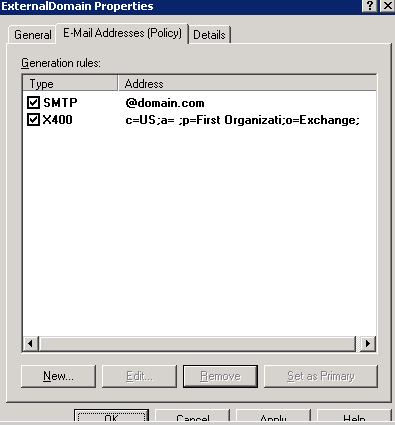
Symptom:
When a new user is created, in some cases an SMTP address is generated in the format of username2@domain.com instead of username@domain.com although there is no such existing address on the network
Cause:
Issue is possibly due to the x400 configuration on the e-mail address policy:
When the email address is stamped, x400 finds the 2nd user as duplicated as the user’s First Name and Last Name are same.
So it adds 2 in the X400.
As the X400 found it as duplicate and added 2 , SMTP also follows the same and adds 2 to address.
Solution/Accepted workaround:
Remove x400 configuration from e-mail address policy and restarted the Exchange services.
*Please note that X.400 address function is not necessarily required in pure Exchange 2007/2010 environments.

Sr. Cloud Solution Architect at Microsoft, I’m passionate about helping customers succeed by building secure, scalable, and innovative cloud solutions – with a strong focus on AI, DevOps practices, and end-to-end security. With a proven track record in the IT and services industry, I serve as a trusted advisor, partnering closely with organizations to guide them through digital transformation and maximize the value of their cloud investments. My role combines technical leadership with project ownership – from designing modern architectures to leading cross-functional implementations that drive real business outcomes. I also manage and empower strategic partners, working hand-in-hand with them to ensure project success and deliver measurable business impact for customers.