Due to recent changes in global privacy and data protection laws ( GDPR & Israeli Privacy Law)
I had to find a quick and easy way to send encrypted PDF files by email.
So, after 6 hours of searching and writing i finally managed to create a workaround
At first I found this Password Protect PDF document script: https://efcomputer.net.au/blog/password-protect-pdf-document/
and i used a part of the code that responsible for encrypting the file (Thanks:) )
So the following PowerShell script will Encrypt PDF files and send them by Email.
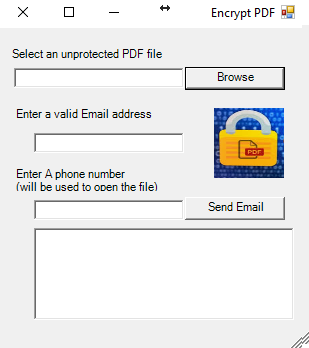
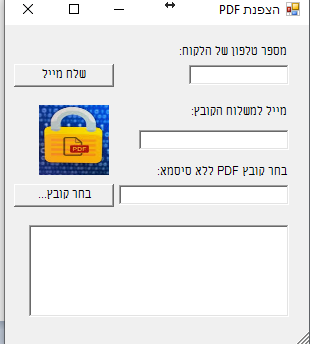
There are two folders, one with an English based form and the other with an Hebrew based form.
It looks like this
English Form:
Hebrew Form:
Have fun 🙂

Sr. Cloud Solution Architect at Microsoft, I’m passionate about helping customers succeed by building secure, scalable, and innovative cloud solutions – with a strong focus on AI, DevOps practices, and end-to-end security. With a proven track record in the IT and services industry, I serve as a trusted advisor, partnering closely with organizations to guide them through digital transformation and maximize the value of their cloud investments. My role combines technical leadership with project ownership – from designing modern architectures to leading cross-functional implementations that drive real business outcomes. I also manage and empower strategic partners, working hand-in-hand with them to ensure project success and deliver measurable business impact for customers.