
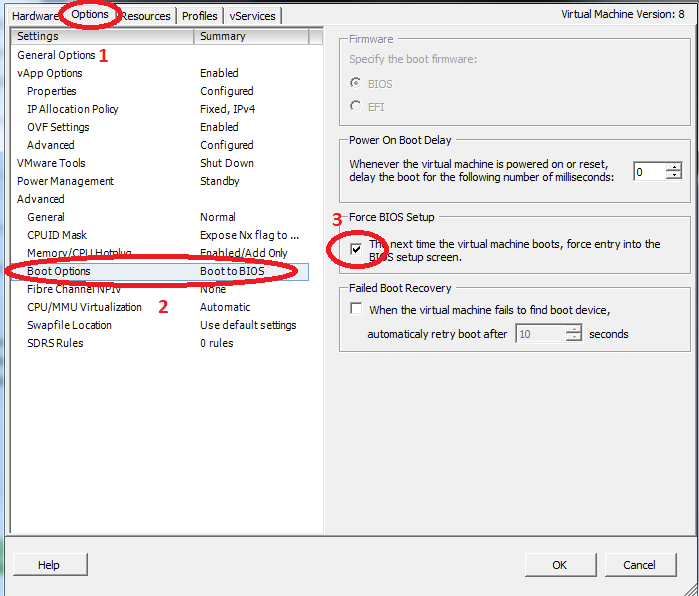
- Edit the machine settings:

- Go to Options tab, select Boot Options, and then Force BIOS Setup:
- In the BIOS go to “Boot” tab, Then stand on the “CD-ROM Drive” and hit the “+” in the keyboard to get the CD-ROM to be first, and hit F10 to save and restart


Sr. Cloud Solution Architect at Microsoft, I’m passionate about helping customers succeed by building secure, scalable, and innovative cloud solutions – with a strong focus on AI, DevOps practices, and end-to-end security. With a proven track record in the IT and services industry, I serve as a trusted advisor, partnering closely with organizations to guide them through digital transformation and maximize the value of their cloud investments.
My role combines technical leadership with project ownership – from designing modern architectures to leading cross-functional implementations that drive real business outcomes. I also manage and empower strategic partners, working hand-in-hand with them to ensure project success and deliver measurable business impact for customers.