ERROR: Updating hybrid configuration failed with error ‘Subtask Configure execution failed: Configure Recipient Settings
Execution of the Set-EmailAddressPolicy cmdlet had thrown an exception. This may indicate invalid parameters in your Hybrid Configuration settings.
The following error occurred during validation in agent ‘Rus Agent’: ‘Failed to validate the proxy address template “YourMS-mailName”. Additional information: Failed to find the address type object in Active Directory for address type “MS:AMD64”..
Consider the following scenario
You have an exchange 2010 environment that was upgraded from an older exchange version
When you try to run the Hybrid configuration wizard you get the following error :
ERROR: Failed to find the address type object in Active Directory for address type “MS:AMD64”..
In my case it was related to the some old email address policies That contained MS-Mail address.
Removing it solve my problem .
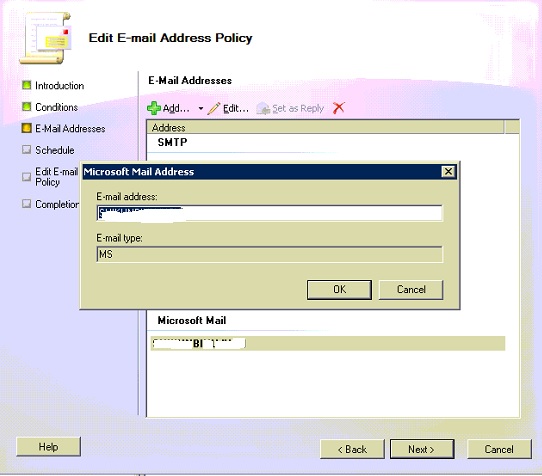
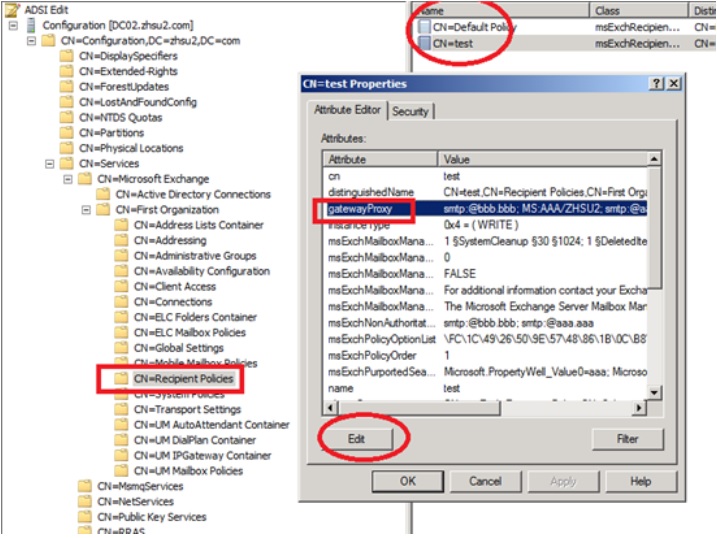
You can remove MS:AMD64 from ADSI Edit like this :

Sr. Cloud Solution Architect at Microsoft, I’m passionate about helping customers succeed by building secure, scalable, and innovative cloud solutions – with a strong focus on AI, DevOps practices, and end-to-end security. With a proven track record in the IT and services industry, I serve as a trusted advisor, partnering closely with organizations to guide them through digital transformation and maximize the value of their cloud investments. My role combines technical leadership with project ownership – from designing modern architectures to leading cross-functional implementations that drive real business outcomes. I also manage and empower strategic partners, working hand-in-hand with them to ensure project success and deliver measurable business impact for customers.