Category Archives: Exchange 2010

Error when trying to add members to distribution group in Exchange 2010

“Changes to the distribution list membership cannot be saved. You do not have sufficient permission to perform this operation on this object.”

image

In Exchange 2010  you need to enable the ability to manage distribution groups

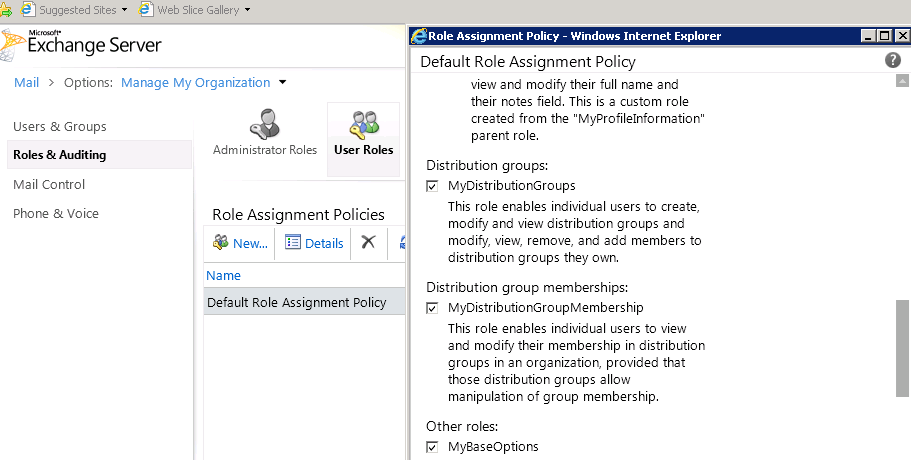
Logon to ECP –> under Roles & Auditing –>”Default Role Assignment Policy”

Under Distribution Group—> check “MyDistributionGroup”
image

This option will allow users to add/remove members to distribution groups they own.

Export Exchange legacy DN For contacts or users to a csv file with Csvde

Open CMD:

Run:


For contacts:

Csvde -d  “OU=MyContacts,DC=Idit,DC=local” -r “(objectClass=contact)” -f c:\Idit-Contacts.csv

For users:

Csvde -d  “OU=MyContacts,DC=Idit,DC=local” -r “(objectClass=users)” -f c:\Idit-Users.csv


Exchange 2010 – How to change the default language for NDR’s in Exchange 2010:

How to change the default language for NDR’s in Exchange 2010:

get-transportconfig | set-transportconfig -ExternalDsnLanguageDetectionEnabled $false -ExternalDsnDefaultLanguage en-us -InternalDsnLanguageDetectionEnabled $false -InternalDsnDefaultLanguage en-us

How to Send Email Using Telnet

How to Send Email Using Telnet:

Open CMD

1. Type telnet server.com 25 (where “server.com” is the name of the smtp (outgoing) server of your email provide

2.Type HELO server.com

3.Type MAIL FROM:User@server.com.

4.Type RCPT TO:Whatever@server.com

To write the message, type DATA and press Enter.   A.On the first line type SUBJECT: yoursubject and press Enter twice.

B.Continue typing your message.

C.Put a single period (.) on a line by itself and press Enter to send your message. The       server should say ‘Message accepted for delivery’. (Or it says 250 OK id=a long id)

5.Type QUIT to exit Telnet

Export Exchange legacy DN For contacts to a csv file with Csvde

Export Exchange legacy DN For contacts to a csv file  with Csvde

Open CMD:

Run:

Csvde -d  “OU=MyContacts,DC=Idit,DC=local” -r “(objectClass=contact)” -f c:\Idit-Contacts.csv

Exchange 2010 on Windows 2008 R2 – Features requirements

Exchange 2010 on Windows 2008 R2 – Features requirements

1) Open powershell

2) Import-Module ServerManager

3) Add-WindowsFeature NET-Framework,RSAT-ADDS,Web-Server,Web-Basic-Auth,Web-Windows-Auth,Web-Metabase,Web-Net-Ext,Web-Lgcy-Mgmt-Console,WAS-Process-Model,RSAT-Web-Server,Web-ISAPI-Ext,Web-Digest-Auth,Web-Dyn-Compression,NET-HTTP-Activation,RPC-Over-HTTP-Proxy -Restart


How to change the default language for NDR’s in Exchange 2010

How to change the default language for NDR’s in Exchange 2010:

Get-transportconfig | set-transportconfig -ExternalDsnLanguageDetectionEnabled $false -ExternalDsnDefaultLanguage en-us -InternalDsnLanguageDetectionEnabled $false -InternalDsnDefaultLanguage en-us